
The Emperor's New Balancers

I wanted to take the time to talk about a project I've been working on for probably close to a year. This is something I'm really proud of and is making/has made a genuine impact to {org}. This article is quite long as I go into a lot of detail, I understand that won't be everyone's cup of tea so feel free to skip over it if word salad isn't to your liking.
When I first started at {org} I noticed that we had a pair of F5 BIG-IP LTM in active/standby mode that most web traffic flowed through. When asking the current staff about how these devices where configured and utilised it became apparent that except for a few small exceptions, these were essentially reverse proxies. 100k a year reverse proxies...
Questions?
Reverse proxies come in many forms but all essentially do the same thing: they sit in front of web services and handle requests which are forwarded to those services. Many web servers can also act as reverse proxies such as: Apache, NGINX, Caddy, IIS among others. Notice how these are all free?
So why are we paying so much money?
F5 make some very powerful and capable hardware and software, the BIG-IP LTM can do so much more than we used it for. In short we were throwing money down the drain.
I asked a colleague why we couldn't replace them with some Linux hosts running one of the aforementioned pieces of software. He replied: "That would be awesome but there is no chance here".
Essentially {org} was all about named brands, vendor support and woe be upon ye if the vendor's logo wasn't on the Gartner Magic Quadrant.
I left it at that, after all I had only been at the company for a month or two and as the old saying goes "Make an impression before you make a suggestion". When you first start at a business you don't know why decisions were made in the past and it's best to not besmirch your fellow colleagues.
The Rising Tide
Years pass and the F5 appliances keep plodding along barely even ticking over and being subjected to a life of menial SNI and proxying with a sprinkling of iRules here and there. Then came 2025 with a very big renewal bill.
Like most subscription based services, costs keep increasing, and 2025 was an especially bad year for bill creep with swathes of companies jacking up their prices, sometimes as much as 300%.
In our morning stand-up one day my boss mentioned the increase in cost for the F5 appliances and asked if we could perhaps do something virtual. He also mentioned that the cost of our certificate provider has increased and if we could lower that bill as well.
Yes, my time has come.
I said I would investigate possibilities and make a plan.
I came up with the following criteria:
And also the following nice-to-haves:
- Free certificates
- Gitops driven config deployment
- Shared certificate storage
I figured all of this was doable but there would be some technical hurdles that would need overcoming.
Choosing The Software
My initial thoughts where to use HAProxy since that is a very powerful and scalable reverse proxy but my understanding was the enterprise version of the software is required to do active/standby deployments. In addition it doesn't have any native cert renewal management and instead relies on external software.
If we were going to have to roll our own active/standby (HA) setup we may as well at least use software that natively supported certificate renewals.
Options here are limited to hobbyist projects like NGINX Proxy Manager or rolling your own cert renewals as with HAProxy.
That is until I remembered the software I ran at home for my own services, Caddy.
Caddy supports automatic certificate renewals using multiple different ACME challenge types, it's easy to configure (one file if you really want it keep it simple), is high performance, comes as a single binary and supports cool new network features like ECH.
But the key thing that made me think "this is it" was the ability to program it at runtime with an API and dynamically reload only if the config changed. Better yet the API accepted Caddyfiles as a payload, we could literally write a normal Caddyfile config, POST it to the server and it would load it.
By utilising this method of config updates we could keep the servers "stateless" and treat them like cattle not pets, if we catastrophically lost a server and it needed to be rebuilt doing so would be easy with no manual configuration or even having to login to the VM itself.
Certified Greatness
So we settled on the software, how do we tackle certificates? Caddy can of course automate cert renewals using the free LetsEncrypt or ZeroSSL services (we opted for ZeroSSL) but that precludes one of two scenarios being valid:
- HTTP-01: The site is reachable by the certificate providers ACME servers externally.
- DNS-01: Caddy can talk to the authoritative DNS servers.
Let me break down why one of these two scenarios need to work.
To generate a free SSL certificate the provider needs you to prove that own the domain name they are issuing the certificate for. If they didn't do this then you could request a certificate for something like google.com and masquerade as them. Clients connecting to your site and seeing a certificate for google.com would ultimately trust it, that coupled with some other MITM techniques or DNS cache poisoning could result in a very strong attack vector.
So we know why the certificate provider needs to validate you own the domain name but not how.
Eons ago certificates were purchased from and generated by huge corporations who charged ridiculous amounts of money for the privilege. At some point the internet denizens decided enough was enough and encryption should be standard across the board. Thus LetsEncrypt was born and with it the ACME protocol. ACME provides a mechanism for a certificate provider to validate that you own the domain you say you do in an automated fashion by utilising so called "challenges". These challenges vary by mechanism but generally most people stick to one of two types: HTTP-01 and DNS-01.
HTTP-01
This mechanism uses a direct connection to the website to validate that the domain name is owned by you or you at least have control over the DNS records. This does preclude the fact that the website must be accessible externally so that the provider's ACME servers can reach it. In our case this wouldn't always be possible as some sites are internal only.
DNS-01
This mechanism is the one we chose simply because it doesn't require an external connection to the site requesting the certificate and can be used to generate wildcard certificates. The challenge works by the ACME client, in our case Caddy, contacting the certificate provider's ACME server which hands back a base64 encoded string. The string is then written to the requesting domain's DNS server as a TXT record and the provider's ACME server performs a DNS lookup for the TXT record, once the record has been validated the ACME server sends the certificate to the client and the client removes the TXT record.
Azure Felis Catus

Just like I am allergic to cats, so to is Caddy.
For DNS-01 to work, Caddy needs to be able to communicate with and write records to the DNS server that provides records for the requesting domain. Caddy achieves this with a combination of a libdns implementation for the target DNS server/provider and a Caddy plugin that consumes the libdns API.
There are many such plugins for a long list of DNS providers some of which are quite esoteric. I figured there would have to be one for {org}'s DNS servers surely?
I was wrong.
See, at {org} we are in the rather unique position of controlling the authoritative DNS servers for the zones we own. A lot of organisations slave that functionality out to external parties which is a wise choice for most situations. We however have some very complex and involved requirements for our DNS infrastructure and it makes sense for us to run the DNS servers ourselves.
In our case that DNS server software is the BlueCat Address Manager (BAM) IPAM system. BlueCat is very powerful (if a little bit cumbersome in places) and features an extensive API that we can communicate with for various automated tasks. It drives our DHCP, DNS and is the source of truth for our dynamic VLAN assignments with HPE Aruba Clearpass Colorless Ports.
What BlueCat was lacking however, was a Caddy DNS provider and libdns implementation. Without these key components we wouldn't be able to use DNS-01 challenges with BlueCat, I did briefly consider delegating ACME challenges to an external supported DNS provider but decided against it. Just for the record this is as simple as creating a CNAME in your DNS servers for the domain you want to delegate: _acme-challenge.org.tld and pointing it at a supported external service which contains a TXT record for that domain. Or you can delegate an entire domain/subdomain with NS records.
I figured that instead of working around the problem I would at least attempt writing a libdns implementation and Caddy plugin first. How hard could it be?
Well I don't know GO which Caddy and it's plugins are written in so it turns out, quite hard.
However... https://github.com/caddy-dns/bluecat
We, and the Caddy project as a whole, now had a working BlueCat provider for use with DNS-01 challenges. It's not perfect and sometimes stumbles when multiple quick deployments are fired in succession but Caddy is intelligent enough to back off and retry when things go wrong. Future improvements to the provider will introduce a debounce timer to the deployment process to mitigate this. (As of writing the debounce timer is actually live)
Storage
Caddy doesn't cluster in the traditional sense, that is to say if you have more than one Caddy server they aren't "aware" of each other. It does support concurrent file locking though which means Caddy will check for a lockfile on a certificate, say just before renewing it, and if it finds one it will back off. This can be exploited by providing shared certificate storage to multiple Caddy servers, none of them need know about any of the others as long as they all obey file locking. This is also the officially supported way of clustering Caddy.
There are a few ways to achieve shared storage between multiple hosts:
All of these rely on storing files on disks in some form or another which I wanted to get away from. I wanted these servers to be stateless so they could be destroyed and rebuilt quickly without any need to setup storage or move configs around.
The next most obvious option was some sort of in-memory key-value store since certificates in our case are encoded as text using the PEM format. This means we can have a key in whatever storage we pick with the name of the certificate and the value can be the certificate material itself.
An example would be:
caddy/certificates/acme.zerossl.com-v2-dv90/test-site.org.tld.crtAs the key, and the value:
LS0tLS1CRUdJTiBDRVJUSUZJQ0FURS0tLS0tCk1JSUJxekNDQVZHZ0F3SUJBZ0lVVGRXdmNyTzZBZ011NDQzcmQ1NzlOQjgrZnZrd0NnWUlLb1pJemowRUF3SXcKSERFYU1CZ0dBMVVFQXd3UmRHVnpkQzF6YVhSbExtOXlaeTUwYkdRd0hoY05Nall3TlRFNE1EVTBPVFUxV2hjTgpNall3T0RFMk1EVTBPVFUxV2pBY01Sb3dHQVlEVlFRRERCRjBaWE4wTFhOcGRHVXViM0puTG5Sc1pEQlpNQk1HCkJ5cUdTTTQ5QWdFR0NDcUdTTTQ5QXdFSEEwSUFCQ3hkUjlNNE1vN1RkcEpBTE0yWm9KdjAzNGRFaTNXSlV4a24KbHFVNnlFb3F0ZkZTYmUyRzY3VXVLaGNmeVhmeHZZRC9MYmkxODRtUzR1V3BwWk5XcnRtamNUQnZNQjBHQTFVZApEZ1FXQkJSL0RnK3F0UUJ4c2U4OXhUTmpGcklDT011MHV6QWZCZ05WSFNNRUdEQVdnQlIvRGcrcXRRQnhzZTg5CnhUTmpGcklDT011MHV6QVBCZ05WSFJNQkFmOEVCVEFEQVFIL01Cd0dBMVVkRVFRVk1CT0NFWFJsYzNRdGMybDAKWlM1dmNtY3VkR3hrTUFvR0NDcUdTTTQ5QkFNQ0EwZ0FNRVVDSVFEazBiWFppQ1lxcFVaaGgwcUVueUIzSzNMRwpObWdwNWJWVy90VVlRelN0d0FJZ1ZpWUM5dlA0VTZyL1FmenQ2OEpFZUVzTHZTT2NTalFyTW5GYzhOOCs0YWc9Ci0tLS0tRU5EIENFUlRJRklDQVRFLS0tLS0KIt looks like gibberish but it's actually a base64 encoded certificate.
Redis
One such in-memory key-value store that I have extensive experience with is Redis which is designed for high performance scalable operations. There is also a Caddy plugin for it so it was an easy choice.
Redis has two operating modes besides the standalone mode that make it particularly interesting for our use case:
In clustered mode the Redis nodes act in a master/slave configuration. The master node is where all writes are directed. Reads can come from the slaves or the master and in the event of a slave becoming isolated operations can continue in a read-only fashion. Since I wanted writes to continue in the case of node failure so certificates would get renewed even with as little as one of three nodes online I needed an active/standby configuration similar to how the F5 worked.
This is where Sentinel mode comes in. Essentially each node runs a Redis process and a Sentinel process. The Sentinel's are constantly communicating with each other and checking the process status of their respective Redis servers, if a Redis server goes offline the Sentinels communicate that change to the cluster and reconfigure themselves accordingly.
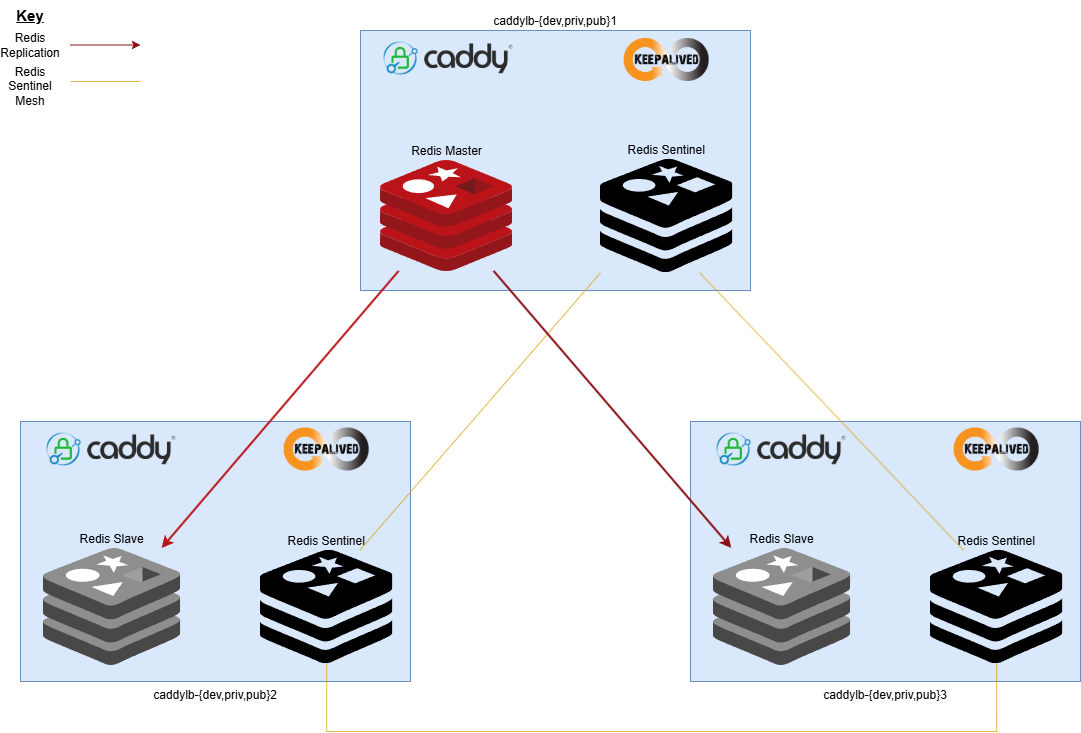
Redis keys also features a TTL which automatically decrements until it reaches zero and Redis removes the entry. This is especially handy for things like certificates which are renewed regularly, the TTL is reset on every update. If the site is removed from Caddy's configuration the cert and associated information will decay out automatically, no need for a clean up routine, though Caddy does feature one for cleanliness sake.
Keepalived
In a clustered environment there needs to be a way for requests to address the entire cluster and for each node to be aware that any other node has failed and take over. Enter keepalived which uses a protocol called VRRP to share a virtual IP address across multiple hosts. These hosts communicate heartbeats to each other and if the master fails then all subsequent nodes negotiate who should become the new master and start processing traffic.
Git Gud

So we had a workable solution that proxied requests and handled certificates automatically but how do we update it's configuration to add new sites? We could of course manually log into each server, update the configuration file and reload the services but that's cumbersome. Especially in {orgs} environment where Caddy servers are deployed into three groups; public, private and development each with three servers per group. Adding a single internal site to be proxied would necessitate logging into each private load balancer in turn, updating the config, reloading the services and checking everything works after.
What we really needed was a dynamic way to configure three servers at once in an easily traceable, auditable and testable way.
Internally at {org} we run a Gitea server (think Github but way smaller and self hosted) which we use for various scripts and code in IT as well as offering it's use up to other departments. Thus far it's utility had been limited to essentially central code storage with very little in the way of branching going on let alone automation or peer review.
That was about to change
Gitea features action runners which are servers that can execute tasks called workflows when certain events or criteria are met within a Git repository. These can range from very simple to incredibly complex but essentially this would allow us to detect a change in a file in the Git repository, determine which load balancer group it should be sent to, check it for syntax errors, simplify the config and then send it over to the load balancer group.
A basic overview of the dev workflow looks like this:
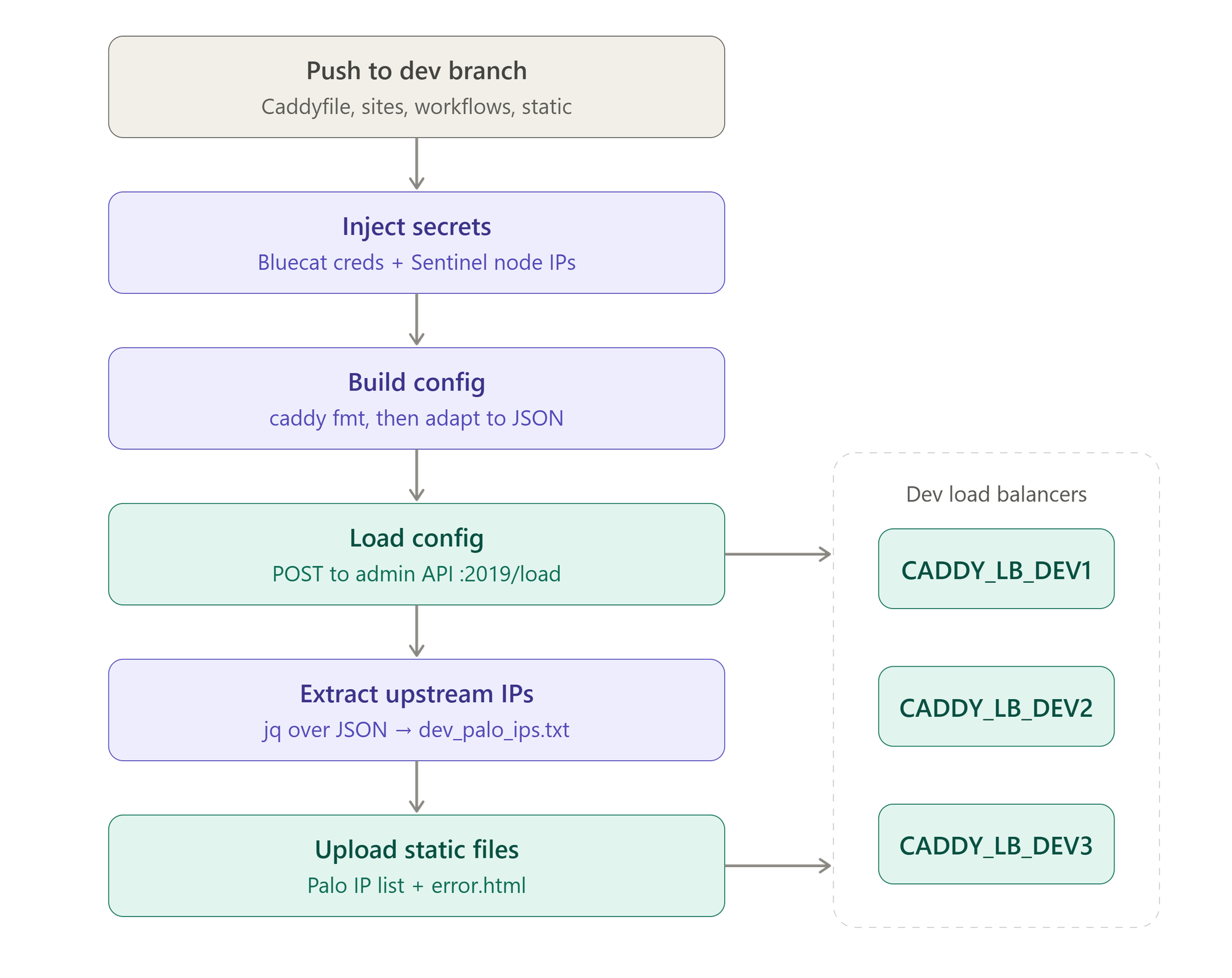
This workflow is called when a push happens to the dev Git branch and a file has changed under the conf/sites/dev/ directory (others also trigger it but for the sake of this article we will focus on the site configurations). The Build config step uses a copy of Caddy that's been compiled for {org}'s requirements, the same version used in production, and tests the config by attempting to load it. If this step fails for any reason the workflow aborts and prints out the error Caddy has provided usually with the offending config line number. Failing at this early stage of deployment is useful since we can catch errors before they even reach the load balancers.
Caddy Servers Rollout!
Each load balancer group has a workflow file associated with it and deployments to those servers only occur when a change has been made to it's associated config files (conf/sites/dev/site1.com.au,conf/sites/private/site2.net.au,conf/sites/public/site3.com) with the dev Git branch being the only one that can be pushed into. For a quick primer on Git operations such as branching and merging see here: https://rogerdudler.github.io/git-guide/
By default a push to the dev branch will only ever deploy the development load balancer group and pushing directly to the main branch is prohibited and protected by Gitea. To deploy a config to the production public or private load balancer groups a merge from dev->main must be performed after which Gitea detects a change to the relevant load balancer group's config files and deploys to those servers.
But what if a broken config makes it into production?
As mentioned before the Build config step actually runs the same Caddy binary we run in production so it can parse and test the same config we use to serve production sites. Assuming a worst case scenario where the config somehow passes inspection during the dev branch Build config step, gets merged into the main branch and then passes the main branch Build config step to make it's way to the Load config step, what then?
The production Caddy servers step in
We program Caddy at runtime with it's API endpoint remember? One of the coolest things about Caddy is its ability to attempt to load a config in memory and then rollback to the previous config if the load fails for any reason. If for some reason a bad config got sent via POST to the production load balancers then Caddy would reject it and reload it's old config whilst sending an error back to Gitea. Even after making it's away through all the checks in the dev branch and branch merge followed by more checks, the workflow could still fail at the final hurdle but the servers would be operational and not left in a broken state due a stray brace or bracket. This deployment flow is designed to be fault tolerant and resilient from development through to production.
Onions

Any cyber security professional you talk to will harp on about "security in layers" ad-nauseum and despite being annoying it is a good rule to follow. Applying multiple layers of security to a system is a good way to prevent the weakness of any one system becoming your undoing, no system is perfect.
Keeping this in mind the Caddy load balancer project was designed with multiple layers of security to make it as resilient as possible. Besides the built-in freebies you get just from running Caddy like:
- An A score for SSL security with no extra configuration: https://www.ssllabs.com/ssltest/analyze.html?d=blog.feisar.xyz
- Compliance
- PCI DSS compliant
- NIST compliant
- HIPAA compliant
- Industry best practices
- Automatic HTTP->HTTPS redirects
- Automatic OCSP stapling with caching
- Automatic STEK rotation
We also bolstered the deployment with local security features.
Docker
At {org} we run Caddy inside a container using Docker in rootless mode. By containerising Caddy we isolate it from the host system and sandbox it's process whilst also allowing us to rapidly deploy new versions and rollback to old ones. Given that {orgs]'s Caddy build includes plugins compiled in for our specific use case we have our own Caddy image stored in the Gitea container registry allowing for tight version control and auditing.
Rootless mode is a way to further isolate container processes so that the root user inside the container maps onto an unprivileged user on the host. If a malicious process or user inside the container was to somehow escape the container sandbox, they would only have access to the resources of the unprivileged user on the host.
Network Least Privilege
When the F5 devices were installed they were given unfettered network access to proxy requests to any server in any subnet which was a logical choice given their role. However now that we have a programmable software based solution we can do better.
Notice the step in the diagram from before that reads "Extract upstream IPs"? That step in the workflow takes the config file, builds a list of all servers to be proxied and then adds them to a flat text file. This text file is then sent over to the load balancers in the "Upload static files" step.
Every 15 minutes the central Palo Alto firewalls download these files and load them into a dynamic access control list which specifies which servers the Caddy load balancers are allowed to talk to.
The Caddy config only allows the Gitea action runner to upload these files and only allows the firewalls to download them so no random file can be uploaded and no one can retrieve the list of IP addresses directly from the load balancers.
Extras?

What else can we do with these new load balancers than can make our lives easier and set them apart from the previous solution?
A lot
Due to the pluggable nature of Caddy and the fact that every directive in it's config is extensible the skies the limit. Two such extra features I have created at {org} are below.
Custom Error Pages
Ever visit a website and been met with some generic HTTP error page? It might be 404 or 502 or something else. A lot of sites simply don't do anything with these errors, they just let the browser display it's default and rather terse boring grey page and leave it at that. Some sites go the extra mile and create a custom error page with a bit more info and a nicer design, almost all load balancing and proxying cloud services provide something of this nature, below is Cloudflare's:
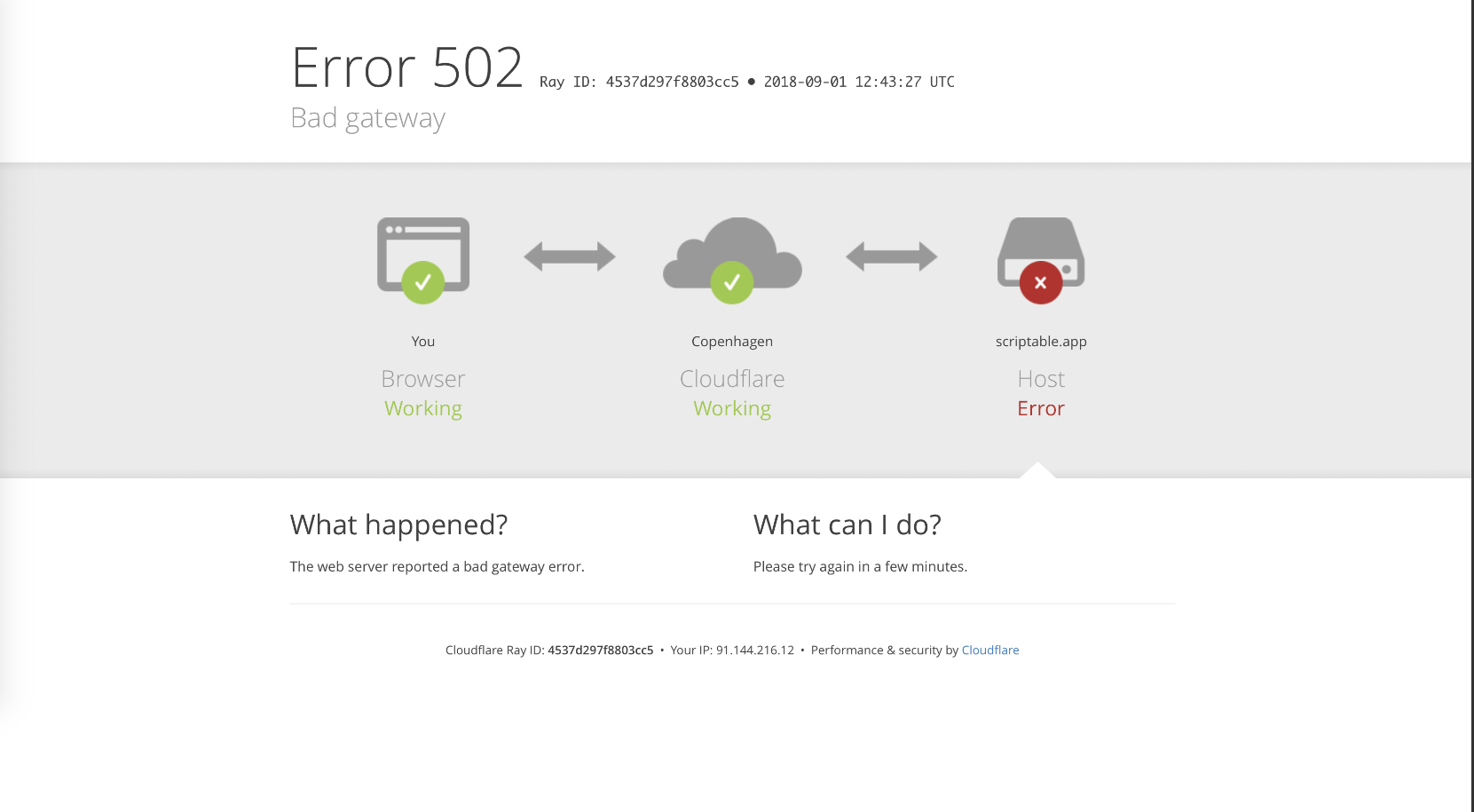
Since we are replacing {org}'s load balancers we can display custom error pages when something goes sideways with the connection to the backend services.
Caddy quite helpfully features a template engine which we can use to inject variables into the page meaning we only need one file. That file is sent over to the load balancers in the same way the firewall IPs file is sent, at the "Upload static files" step. What does it look like? Well this:
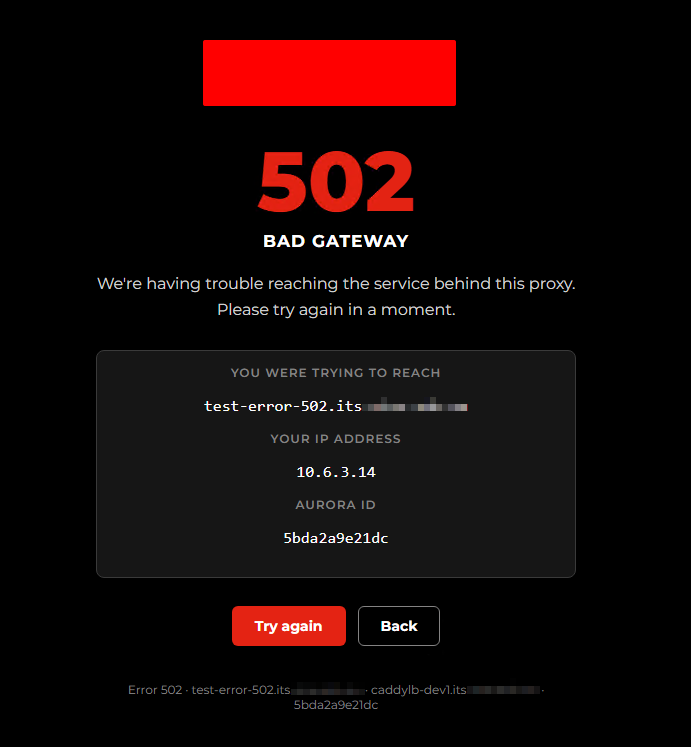
The red rectangle at the top would normally contain our logo which I've covered up for this example and the blurry text would contain the domain name.
Essentially this error page contains all the info a technical support person would need to troubleshoot a connection issue. With one small {org} specific addition.
Aurora ID
You may have noticed a piece of info that Cloudflare error pages provide whilst many others do not. The Ray ID.
A Ray is Cloudflare parlance for a request (think ray of light that passes through the clouds and down to multiple locations) and can be used to trace a request from end to end. Cloudflare adds the header "cf-rayid" to the request and that header normally makes it all the way through to the backend application, if an issue occurs at some point along the way that header can be used to find out where it all fell over.
Since we have control of the load balancers and can add or remove headers freely I thought it might be a good idea to emulate this with our own header: aurora-id. Why aurora? Since {org} is in Tasmania and the Aurora Australis is visible with the naked eye down here I thought I'd make it sound somewhat cool as well as paying homage to our location.
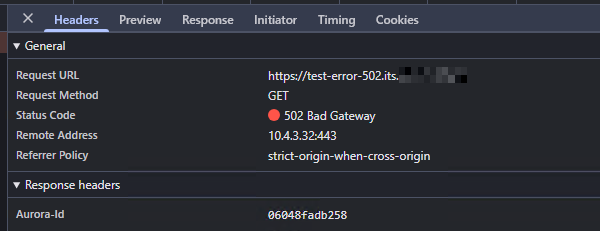
As long as backend services log the aurora-id then tracking issues right through from the browser to the application should be relatively easy.
Conclusion
There absolutely will be more features and functions added to the load balancers as I discover new capabilities and the Caddy project adds new features.
Watch this space for future articles on the project.
Addendum
I have it on good authority that a meeting happened with F5 to talk about ending the current licensing. When they asked why and what was going to replace the LTM appliances our technical lead told them of this project.
Their reply...
Oh we don't have anything as fancy as that
